
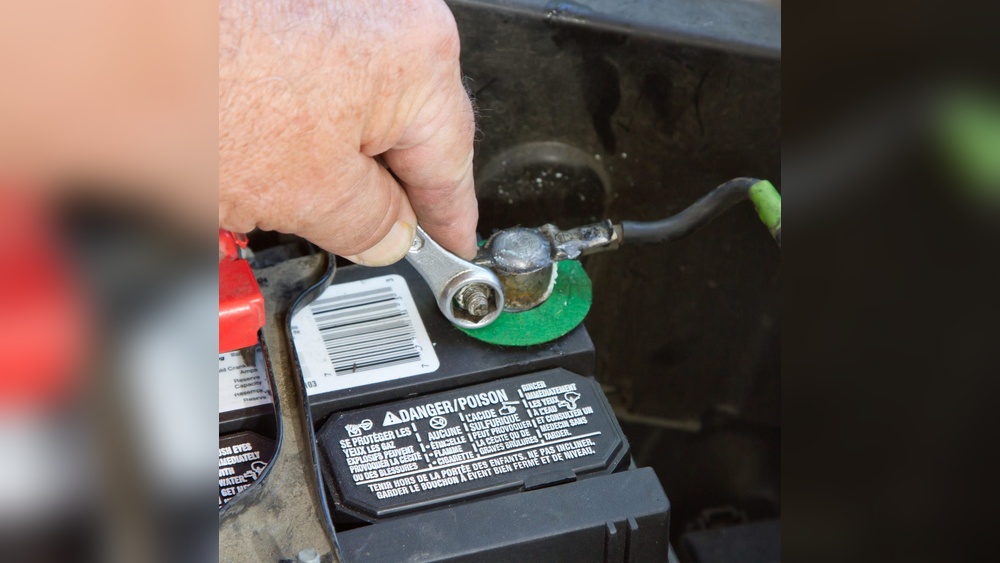
Unplugging a car battery is a useful skill. It helps when you want to fix your car or replace the battery. Doing it right is very important. This guide will show you how to unplug a car battery safely and easily.
Why Unplug a Car Battery?
Sometimes, you need to unplug the car battery. Maybe the battery is old and needs changing. Or you want to fix electrical parts in your car. Unplugging stops electricity flow. This keeps you safe and avoids damage.
What You Need Before Unplugging
Before you start, get these things ready:
- Safety gloves to protect your hands.
- Safety glasses to protect your eyes.
- A wrench or pliers to loosen the battery cable.
- A clean cloth to wipe the battery terminals.
Wearing gloves and glasses is very important. Car batteries have acid. It can hurt your skin and eyes.
Where to Find Your Car Battery
The car battery is usually under the hood. Open the hood using the lever inside your car. Look for a box with two cables. One cable is red. The other is black. This is your battery.
Steps to Unplug the Car Battery
Follow these steps carefully. They will help you unplug the battery safely.
Step 1: Turn Off Your Car
Make sure your car is off. Take the key out of the ignition. This stops electricity from flowing.
Step 2: Find The Negative Terminal
The battery has two terminals. One is positive (+) and one is negative (-). The negative terminal usually has a black cable. Look for the “-” sign. This is the terminal to unplug first.
Step 3: Loosen The Negative Cable
Use a wrench or pliers to loosen the nut on the negative terminal. Turn the nut counterclockwise. Do not remove the nut completely. Just loosen it enough to move the cable.
Step 4: Remove The Negative Cable
Carefully pull the negative cable from the terminal. Do not touch the positive terminal with this cable. Keep the cable away from the battery.
Step 5: Loosen The Positive Terminal
Now, find the positive terminal. It usually has a red cable and a “+” sign. Loosen the nut on this terminal, like before.
Step 6: Remove The Positive Cable
Pull the positive cable off the terminal. Keep it away from the battery and other metal parts.
Step 7: Remove The Battery (if Needed)
If you want to take the battery out, check if there is a clamp holding it. Loosen or remove the clamp. Then lift the battery carefully. Batteries are heavy, so use both hands.
Important Safety Tips
- Always remove the negative cable first. This stops sparks.
- Do not touch both terminals at the same time.
- Keep metal tools away from the battery top.
- Work in a well-ventilated area. Car batteries can release gases.
- If acid spills on your skin, wash it with water quickly.
Common Problems and How to Fix Them
Sometimes, battery terminals are dirty or rusted. This makes it hard to unplug cables.
- Use a wire brush or cloth to clean terminals.
- If nuts are stuck, spray some lubricant and wait a few minutes.
- Be gentle when loosening nuts. Too much force can break parts.
How to Reconnect the Battery
When you finish your work, you may want to connect the battery again. Follow these steps:
- Put the battery back in place if you removed it.
- Attach the positive cable first. Tighten the nut securely.
- Attach the negative cable next. Tighten the nut securely.
- Check the cables to make sure they are tight.
- Close the hood of your car.
Connecting the positive cable first avoids sparks.

Credit: www.wikihow.com
How to Dispose of Old Car Batteries
Old batteries should not be thrown in the trash. They have harmful chemicals.
Take old batteries to a recycling center or car shop. Many places accept used batteries for safe disposal.

Credit: www.youtube.com
Summary Table: Steps to Unplug Car Battery
| Step | Action | Important Note |
|---|---|---|
| 1 | Turn off the car and remove the key | Stops electricity flow |
| 2 | Find the negative terminal (black cable) | Look for “-” sign |
| 3 | Loosen nut on negative terminal | Turn counterclockwise |
| 4 | Remove negative cable carefully | Keep away from battery |
| 5 | Loosen nut on positive terminal (red cable) | Look for “+” sign |
| 6 | Remove positive cable carefully | Keep away from battery |
| 7 | Remove battery if needed | Use both hands, be careful |
Final Words
Unplugging a car battery is simple with care. Always put safety first. Follow the steps in order. Use tools carefully. If you feel unsure, ask for help from a mechanic.
With this guide, you can unplug your car battery safely. This skill helps you take care of your car better.
Frequently Asked Questions
How Do I Safely Unplug A Car Battery?
Always disconnect the negative terminal first to avoid sparks. Use insulated tools and wear gloves for safety.
What Tools Are Needed To Unplug A Car Battery?
A wrench or socket set is usually required. Gloves and safety glasses help protect you.
Can I Unplug A Car Battery Without Turning Off The Car?
No, always turn off the engine and remove the keys first. This prevents electrical shocks or damage.
How Long Does It Take To Unplug A Car Battery?
It usually takes 5 to 10 minutes. Take your time to avoid mistakes.

Sudatta is a passionate automotive enthusiast and expert in the field. With a keen eye for detail and a love for all things automotive, he shares insightful articles and reviews to ignite the automotive passion in readers.